Quick answer: AI and machine learning forecast a capital project's cost and schedule outcomes from current performance. But those predictions only hold if the risks behind them are managed and the resulting changes are documented. Integrating risk management with change management, so every occurred risk is traced to a potential change order, change order, and budget adjustment, is what makes AI predictions on capital construction projects reliable rather than theoretical.
The main goal of using machine learning (ML) and artificial intelligence (AI) on capital construction projects is to give stakeholders a better prediction of future results based on current performance and actions. Reaching that goal depends on the quality of the data behind it. Every project carries assumptions made to address unknowns, and each assumption creates risks that can change the project's cost and delivery duration. Those risks have their own likelihood of occurrence and their own severity of impact on project objectives if they occur. If the project does not capture how those risks are identified, quantified, and resolved, an AI model has nothing dependable to learn from, and its forecasts become guesses.
That is why risk management is a critical process for every capital construction project and an integral requirement of the Project Management Plan (PMP). Risks need to be identified, analyzed, assessed, quantified, responded to, monitored, and controlled. When a risk actually occurs, change management is used to adjust the project's baseline cost and schedule plan to reflect the impact.
Why AI predictions fail without integrated risk and change management
An AI model is only as good as the record it is trained on. When risks are tracked in one place and changes in another, the link between a risk and its cost and schedule impact is lost. The model cannot see which assumptions turned into real cost, so it cannot improve its forecasts. Integrating the two processes closes that loop: every occurred risk is tied to the change it caused, giving both people and algorithms a clean, auditable basis for predicting cost and schedule outcomes. PMWEB's AI approach for capital project management is built on this same principle of connected, governed project data.
The four change management processes that document a risk
Alongside the risk management process, four interrelated change management processes are used to manage and document the actual impact of risks.
The first is the Potential Change Order, used to immediately capture the impact of a risk that has actually occurred. Analyzing the potential change determines which contracting party is liable. From a Project Owner's perspective, the question is whether the Contractor is responsible for the risk. If yes, the process ends there, because the Contractor is liable for all its implications. If not, the Project Owner issues a Change Order.
The Change Order is the second process. It covers the cost and schedule implications of the occurred risk and formally adjusts the contract agreement with the Contractor.
The third process determines how the change order's cost is reflected in the project budget. This depends on whether the cost sits outside the project's original scope of work. If it is out of scope, the baseline budget must be increased. If the risk was one of the identified risks with funds already allocated, either in the project contingency (Unknown-Known risks) or the management reserve (Unknown-Unknown risks), funds are transferred from that reserve. The Budget Request process captures all these risk-related budget increases or transfers to the approved baseline budget.
The fourth process ensures that the Change Order issued in response to a risk is aligned with the Budget Request that adjusts the baseline budget. It confirms that all change orders and budget additions or transfers are clearly associated with the risk that caused them. In other words, the actual cost and schedule impact of the risk must be fully visible and fully documented.
How a PMIS links the five business processes
Using a Project Management Information System (PMIS) like PMWEB, this integrated risk and change management process is one of many ready-to-use business processes. The Risk Analysis, Potential Change Order, Change Order, Budget Request, and Change Event modules manage the five business processes required, with built-in integration so that every project change is associated with the risk that caused it. This is the kind of connected control and execution that owner-operators need across a capital portfolio.
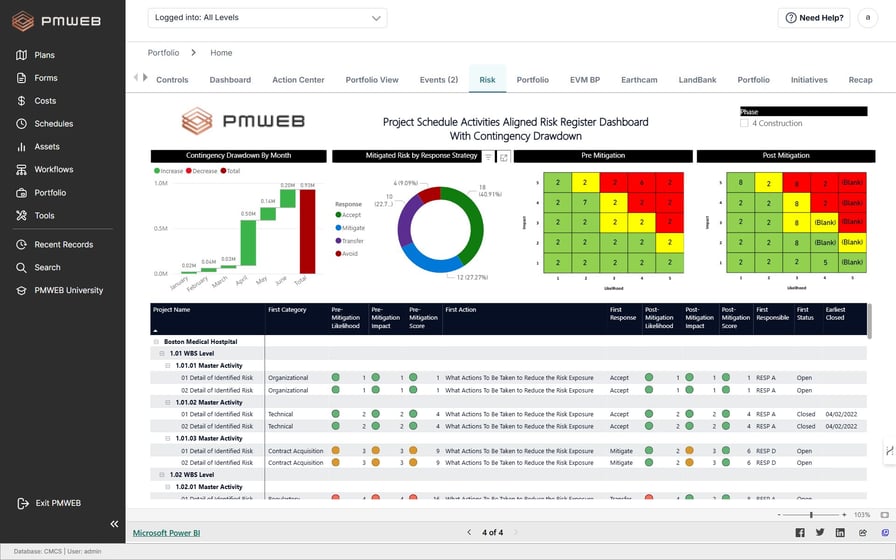
Risk Analysis. Access should be given to everyone who can contribute to identifying, assessing, quantifying, and recommending responses to risks. There is no limit to the number of risk analysis templates per project, and templates should be unique to each risk category, covering a single risk or a group of closely interrelated risks. For each identified risk, the template captures risk type (per the risk breakdown structure), risk owner, occurrence probability, impact severity, probability value, impact value, cost, delay, risk cost, risk delay, WBS level, affected schedule activity, response, and any user-defined fields needed.
Potential Change Order. This module is the early warning notification that a risk has actually occurred. The template is linked to the risk analysis template that identified the risk, and it captures the actual cost and schedule impact. Depending on the review decision and whether the Contractor or the Project Owner is responsible, a change order may or may not be generated.
Change Order. This process formally issues the change order or variation order that adjusts the contract agreement with the Contractor, including the associated cost and time impact.
Budget Request. This module either increases the baseline budget or transfers funds from the contingency or management reserve, depending on the risk type behind the change order. If the occurred risk was already considered part of the original scope of work, a budget transfer is required.
Change Event. To ensure budget requests and change orders stay aligned, the Change Event module captures the budget request and change order details associated with the change. It also links the risk analysis template and the potential change order raised when the risk occurred. Additional fields can capture the originally identified risk, the cost and schedule impact of the risk that occurred, the change order issued in response, and the effect on the project budget.
Supporting documents, workflow, and reporting
For each of the five business process templates, supporting documents can be attached to explain and support the transaction: pictures, videos, Microsoft Excel files, and other documents. The attachment tab stores these, and it is good practice to add comments describing each document. The attachment tab also lets users link other PMWEB business process records and associate URL hyperlinks to external websites or documents.
All supporting documents should also be uploaded into the PMWEB document management repository, organized into folders and subfolders and secured with folder-level access rights. PMWEB can also notify individuals by email when documents are uploaded, downloaded, or deleted.
To enforce accountability, the PMWEB workflow module creates a formal review and approval workflow for each transaction across the five processes. The workflow maps the sequence of review and approval tasks, the role or user assigned to each task, the duration allotted, and availability. It can also include conditions that enforce approval authority levels defined in the Delegation of Authority (DoA) matrix. When a transaction is submitted, the workflow tab captures both the planned tasks and the actual history, including action date and time, who acted, the action taken, comments, and whether team input was requested.
Because the Project Owner must formally communicate the change order to the Contractor, an output document can be designed to be printed and wet-signed before issue. PMWEB ships with more than 150 ready-to-use forms, reports, and dashboards, and each Project Owner can design their own to display the required information in the required format while respecting Project Owner or project branding requirements.
Finally, the data captured across the five processes feeds a report that integrates risks, potential change orders, change orders, and budget requests. Drawn from the risk register, it selects only the risks that have actually occurred and adds visuals showing how many identified risks occurred, how many occurred risks were new and not in the original register, the cost of proposed change orders by the party the risk is assigned to, change order values for in-scope and out-of-scope work, and, for in-scope budget adjustments, the amounts drawn from contingency and management reserve. That report is exactly the kind of clean, connected record an AI model needs to forecast cost and schedule with confidence.
The bottom line
AI does not replace disciplined project controls; it depends on them. On capital construction projects, integrating risk management with change management inside a single PMIS gives you the traceable, well-documented data that both your team and your AI models rely on to predict cost and schedule outcomes. See how PMWEB brings this together across your portfolio, or request a demo to walk through the integrated risk and change management processes with our team.
Frequently asked questions
What is the difference between risk management and change management in construction?
Risk management identifies, quantifies, and plans responses to events that might affect a project's cost or schedule. Change management is used when a risk actually occurs, adjusting the project's baseline cost and schedule plan and documenting the impact through potential change orders, change orders, and budget requests.
How does AI improve risk and change management on capital projects?
AI and machine learning analyze current performance to predict future cost and schedule outcomes. Their accuracy depends on integrated risk and change data, so every occurred risk is linked to the change it caused. Without that traceable record, AI predictions lack a dependable basis.
What is a potential change order?
A potential change order is the early warning that a risk has actually occurred. It is linked to the risk analysis template that identified the risk and captures the actual cost and schedule impact, so the project can decide whether a formal change order is needed and which party is liable.
How is a change order reflected in the project budget?
If the cost is outside the original scope of work, the baseline budget is increased. If the risk was already identified with allocated funds, the money is transferred from the project contingency (Unknown-Known risks) or the management reserve (Unknown-Unknown risks). A Budget Request captures the increase or transfer.
What is a change event in a PMIS?
A change event is the record that keeps budget requests and change orders aligned. In PMWEB it links the risk analysis template, the potential change order, the change order, and the budget request so the full impact of an occurred risk is documented in one place.