
In construction, quality assurance goes far beyond visual checks. Every phase, from excavation to finishing, must meet design, safety, and regulatory requirements. That’s where a work inspection request (WIR) comes in.
A WIR is a formal checkpoint in the construction process. It ensures that completed work is inspected, verified, and approved before the project moves forward. Whether you're building a commercial high-rise, an industrial facility, or a transportation hub, the WIR process ensures accountability at every critical milestone.
In this guide, we’ll break down everything you need to know about Work Inspection Requests in construction—what they are, why they matter, who’s involved, and how to manage them efficiently.
What is a work inspection request?
A WIR is a formal document submitted by the contractor to the supervising consultant or engineer to verify that specific portions of the completed work comply with project specifications, drawings, and approved materials.
It serves as a mandatory checkpoint for quality verification before moving to the next phase of construction or before including completed work in an interim payment certificate (IPC).
Each WIR references:
- The exact section of work to be inspected
- Supporting documents such as method statements, approved shop drawings, and material submittals
- Relevant codes, standards, and contractual requirements
Once submitted, the supervising consultant or engineer performs a visual and technical review. If the work meets all requirements, formal approval is issued. Only then can the contractor proceed to the next phase or claim the completed scope for billing.
Why is WIR important in construction projects?
Construction requires coordination between multiple trades, vendors, and timelines. Missing a key inspection can lead to:
- Non-compliance with technical or legal standards
- Hidden defects that compromise structural integrity or performance
- Delays and rework due to unverified or rejected work
- Disputes over scope, quality, or payment
A work inspection request formalizes the contractor’s readiness for inspection. The outcome, whether it’s approval or rejection, is documented, which protects everyone involved and builds traceability into the project.
Here’s how a WIR in construction supports several critical areas:
- Quality assurance: Ensures systematic checks to identify defects early and maintain construction standards.
- Regulatory compliance: They ensure work is compliant with local codes and regulations, reducing the risk of breach and penalty.
- Documentation & accountability: WIRs generate a documented record of inspections, ensuring transparency and facilitating dispute resolution.
- Payment verification: Through verification of completed work to standards, WIRs facilitate proper and justified payments to contractors.
- Risk mitigation: WIRs facilitate early detection of issues and avoid rework, delays, and legal problems and lower project risk
Lifecycle project management tools like PMWEB streamline the WIR process by enabling centralized tracking, standardized forms, real-time status updates, and secure document control—all within a single integrated platform.
Understanding the basics of WIR
The WIR process plays a vital role in controlling quality and progress on-site. It structures how inspections occur at critical stages, such as Hold Points, which require stopping work for approval, and Witness Points, where the engineer observes but work may continue without their presence.
The purpose of a WIR
At its core, a WIR is a formal mechanism that initiates quality verification at critical stages of the construction process. It introduces a pause in the workflow, prompting an inspection before moving forward to subsequent tasks. This ensures that each stage is built upon verified, compliant work, reducing the likelihood of rework or cascading errors.
Specifically, a WIR confirms that:
- Completed work conforms to approved project specifications, including structural, architectural, mechanical, and electrical design criteria
- Drawings, local and international codes, and project-specific quality benchmarks are adhered to, ensuring regulatory and contractual compliance
- Roles and responsibilities are clearly documented, identifying who performed, inspected, and approved each stage of the work, thereby strengthening traceability and accountability
Key stakeholders involved in the WIR process
Several parties play an active role in the WIR process. Let’s break them down:
- Contractor: The contractor prepares and submits the WIR after completing a portion of the work. They are responsible for ensuring that all work complies with the approved drawings, specifications, and safety standards before requesting an inspection
- Consultant/Engineer: The consultant or supervising engineer receives and reviews the WIR. They inspect the work, compare it to approved standards, and decide whether to approve, reject, or request corrections
- Client/Owner/Project Management Consultant (PMC): The client or owner may not be involved in every inspection, but they rely on the consultant’s approvals to ensure the project is being executed as agreed upon. Some clients may have their own representative participate in witness points or major milestone inspections
Components of a work inspection request
A complete and well-structured WIR in construction includes the following essential components:
1. Project information
Basic details like project name, contractor name, WIR number, and location of the work to be inspected.
2. Description of work
A concise description of what work is being presented for inspection. e.g., “Formwork and steel reinforcement for ground floor slab, Zone A.”
3. Reference documents
Includes all relevant drawings, specifications, method statements, or approved shop drawings. These references help the inspector verify if the work is compliant.
4. Inspection category (Hold point / Witness point)
This defines the type of inspection:
- Hold point: No work can proceed without formal approval
- Witness point: Work can proceed, but the inspector is invited to witness the process
5. Date and time for inspection
The proposed date and time for the inspection should be confirmed, allowing the consultant to schedule and prepare accordingly.
The WIR process explained step-by-step
The WIR process follows a clear sequence of actions to keep inspections organized and effective. Each step involves specific tasks and responsibilities that move the project forward without surprises.
Step 1: Preparing the WIR
As soon as a portion of the work is completed, the contractor or QA/QC personnel prepares the WIR. This involves:
- Finishing all the work items enumerated in the scope
- Verifying every component with drawings and ITPs
- Collecting documents such as photographs, test results, and checklists
Verify the inspection date with all stakeholders to ensure no delay.
Step 2: Submitting the WIR
The consultant reviews the submission thoroughly, comparing the work against project standards and codes. They conduct a site inspection when required and assess whether the work meets contractual requirements.
The consultant then provides formal feedback, either approving the work or requesting corrections.
Step 3: Consultant review and response
The engineer will then review the WIR and compare it to:
- IFC drawings
- Past approvals
- Site inspections
- Supporting test results
They can request clarification, reject it, or accept it with comments in case of minor corrections. In case of rejection, the contractor will have to reply to all comments, make corrections, and resubmit the WIR. This step prevents substandard work from progressing and maintains quality control.
Step 4: Approval or rejection
Based on findings, the WIR is:
- Approved: All good, work moves forward
- Approved with comments: Noted issues don’t stop progress
- Rejected: Issues must be fixed before moving ahead
If rejected, the contractor must address all comments, correct issues, and resubmit the WIR. This step prevents substandard work from progressing and maintains quality control.
Each result is dated and signed either digitally or in person.
Step 5: Record keeping
Every WIR becomes part of the project record. These entries help with:
- Final handover
- Contract claims
- Internal and external audits
Keeping a WIR log provides managers with insight into inspection patterns and areas that require attention.
How PMWEB simplifies your work inspection request workflow
With the right tools and practices in place, you don’t just catch errors, but also build confidence into the project from the ground up. As a lifecycle project management software, PMWEB provides your team with complete control over the WIR process, from initiation to closeout. Here are some of its key features:
1. Customizable WIR templates for trade-specific inspections

PMWEB inspection checklist for exterior insulation and finish systems
The visual form builder lets you create project-specific WIR templates tailored to each trade, discipline, or system. You define checklist items based on contract requirements, codes, and approved drawings, down to individual inspection items for systems like electrical, mechanical, or structural.
Each template includes fields for specification references, inspection status, and remarks, ensuring there is no ambiguity about what was inspected or why.
2. Mobile-friendly interface

PMWEB safety checklist for electrical inspections with hazard analysis and PPE review
All WIRs can be accessed directly from mobile devices on-site. This allows your team to capture photos, videos, and field data in real-time and attach them to the inspection request. The assigned workflow routes the WIR to the consultant, who either approves it or sends it back for correction.
3. Customizable WIR dashboards for insightful reporting

PMWEB WIR dashboard showing performance metrics by inspection type and contractor
You also get a full performance dashboard built from WIR data. It logs every inspection by division, location, or contractor and presents trends visually. You can modify the layout to meet your reporting standards or client requirements without needing separate tools.
4. Integrated material inspections
Alt Text: PMWEB form interface for creating and tracking Material Inspection Requests with detailed fields
Caption: PMWEB Material Inspection Request (MIR) form used for tracking supplier and material verification
Beyond WIRs, PMWEB also supports Material Inspection Requests (MIRs). You can create separate forms to track material deliveries, storage conditions, manufacturer details, and compliance with technical specifications. All inspections, approvals, and related documents are stored in one system, providing a central source of truth for quality control.
5. Scoring tools drive quality and stage gate decisions

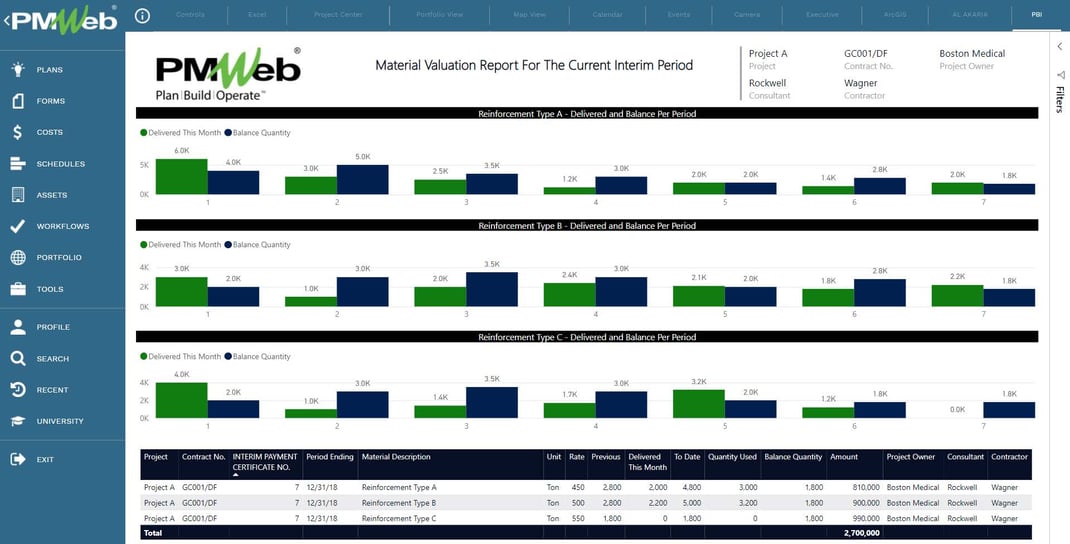
PMWEB report shows delivered vs. balance quantities for materials across the current interim period
Project owners also use PMWEB’s Scoring Tool to evaluate inspection outcomes or decide whether to advance projects through stage gates. You can build weighted scoring models, define criteria, and apply them across your portfolio. For BIM-enabled workflows, PMWEB integrates with Autodesk Revit, where you can link customized scoring to model elements and track completeness.
Ready to streamline your work inspection requests? Discover how PMWEB centralizes inspections, approvals, and quality tracking in one platform, specifically designed for owners and contractors. Book a demo today.
FAQs
What happens after a WIR is approved?
Once the work inspection request is approved, the contractor proceeds to the next activity. The signed WIR is archived as an official record confirming that the inspected work meets project requirements.
Who is responsible for raising a WIR?
The contractor or the designated QA/QC (Quality Assurance/Quality Control) personnel is responsible for raising the work inspection request after completing a defined scope of work. They prepare the form, attach the required documents, and submit it for review by the supervising consultant or engineer.
Is a WIR mandatory for all construction activities?
A work inspection request is required for all activities identified in the project’s Inspection and Test Plan. These typically include critical tasks tied to structural, mechanical, electrical, and code-related work.